Networking for Hacking: A Ground-Up Guide to the Wire Every Exploit Travels
Layers, packets, the TCP handshake, scanning, subnetting, ARP, DNS, firewalls and pivoting — the complete networking foundation every ethical hacker needs, built from the wire up with diagrams and examples.
ZeroDaysHack Team
November 18, 2026
Every exploit you will ever run travels over a network you did not build. Before you touch a single tool, the difference between a tester who gets lucky and one who gets repeatable results is a real mental model of how packets move, where trust is assumed, and which assumptions break under pressure. This guide builds that model from the wire up — the way you actually need it on an engagement, not the way a textbook orders it.
Everything here is for authorised testing only: your own lab, a CTF, or a scope you have written permission to touch. The concepts are universal; the places you practise them are not.
#Why networking is the attack surface
A target is not a logo on a login page. It is a set of hosts, each listening on some set of ports, reachable (or not) across routers and firewalls, trusting (or not) the other machines around it. Every one of those words — listening, reachable, trusting — is a networking property. When you "find a vulnerability", what you have usually found is a gap between what the network assumes and what it enforces.
So the skills split into two questions you will ask over and over:
- What can I reach, and what is it? — discovery, scanning, service identification.
- What does this thing trust that it shouldn't? — spoofing, interception, pivoting.
Hold those two questions in your head and the rest of this article is just detail.
#The two stacks: OSI and TCP/IP
You will hear both models constantly. OSI is the seven-layer teaching model; TCP/IP is the four-layer model the real internet actually runs on. You do not need to worship either — you need to know which layer a given attack lives on, because that tells you which tool speaks that language and which defence is supposed to stop you.
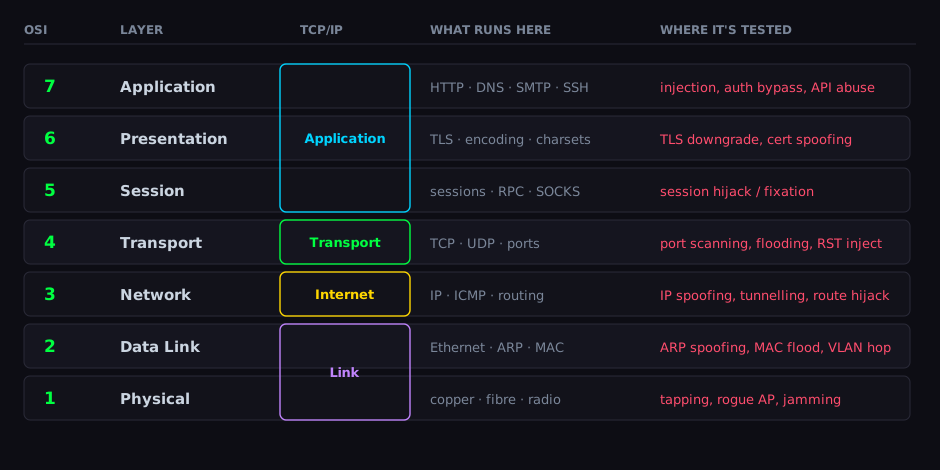
The single most useful habit this diagram builds: when you hit something, ask "what layer is this?". A failed login is layer 7. A port that won't answer is layer 3–4. A machine that answers for an IP that isn't its own is layer 2. Each answer points at a different half of your toolkit.
#What a packet actually is
Data does not travel as "a request". It travels as a frame that contains a packet that contains a segment that contains your payload — each layer wrapping the one above it with its own header. This is encapsulation, and understanding it is the difference between reading a packet capture and being confused by one.
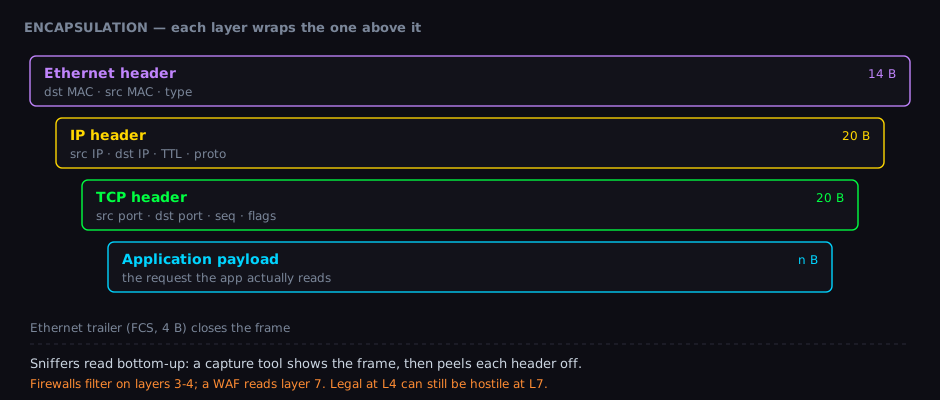
When you open a capture tool later, it shows you these layers as a stack you can expand. Reading bottom to top: the Ethernet header gets the frame to the right network card on the local wire. The IP header gets the packet across the internet to the right host. The TCP header gets it to the right conversation on that host (a port, a sequence number). Only then comes the payload the application actually cares about.
Every header is a place where something can lie. An IP header can carry a forged source. An Ethernet header can claim a MAC that isn't yours. The whole craft is built on the fact that most of these fields were designed in an era that assumed everyone on the network was friendly.
#Addresses: MAC, IP, and ports
Three kinds of address matter, and beginners constantly confuse them:
| Address | Layer | Scope | Example | Who assigns it |
|---|---|---|---|---|
| MAC | 2 (Data Link) | the local wire only | aa:bb:cc:11:22:33 | burned into the NIC (but changeable) |
| IP | 3 (Network) | across the whole internet | 10.10.5.20 | DHCP or static config |
| Port | 4 (Transport) | one service on one host | :443 | the application that listens |
The mental model: an IP address gets a packet to the right building; the MAC address gets the frame to the right door on your floor; the port gets it to the right person in the room. A packet crossing the internet keeps the same source/destination IP the whole way, but its MAC addresses are rewritten at every router hop — because MAC only has meaning on the local segment.
#TCP, UDP, and the handshake everything depends on
TCP is the reliable, ordered, connection-oriented protocol. Before any data flows, it performs a three-way handshake. This tiny exchange is the foundation of almost every scanning technique, so it is worth understanding exactly, not approximately.
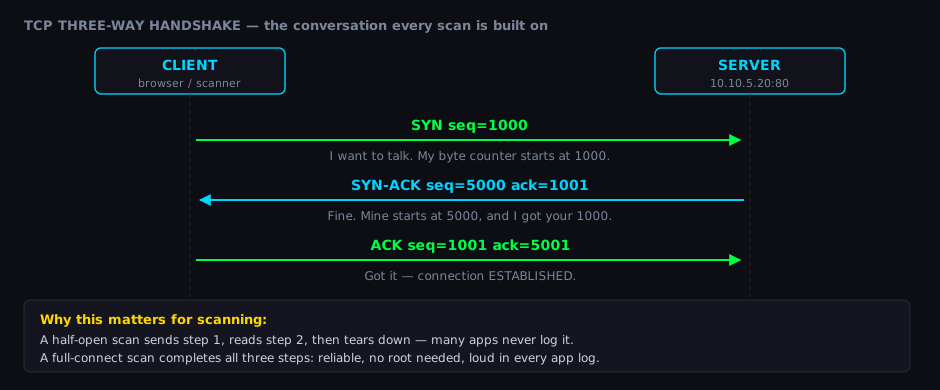
The sequence numbers are not decoration. Each side picks a starting number and counts every byte from there, which is how TCP guarantees order and detects loss. It is also why blindly injecting into someone else's TCP session is hard — you would have to guess those numbers.
UDP, by contrast, has no handshake. You send a datagram and hope. No connection, no ordering, no built-in reliability. That makes UDP faster and stateless — and it makes UDP scanning slow and ambiguous, because silence can mean "open", "filtered", or "the reply got lost". DNS, DHCP, SNMP, and most VoIP live on UDP, so you cannot skip it.
#Scanning: turning the network into a map
Discovery is where networking knowledge turns into results. A scanner sends crafted probes and infers state from the replies — because a host never volunteers "I have port 22 open". You deduce it from how it answers each type of probe.
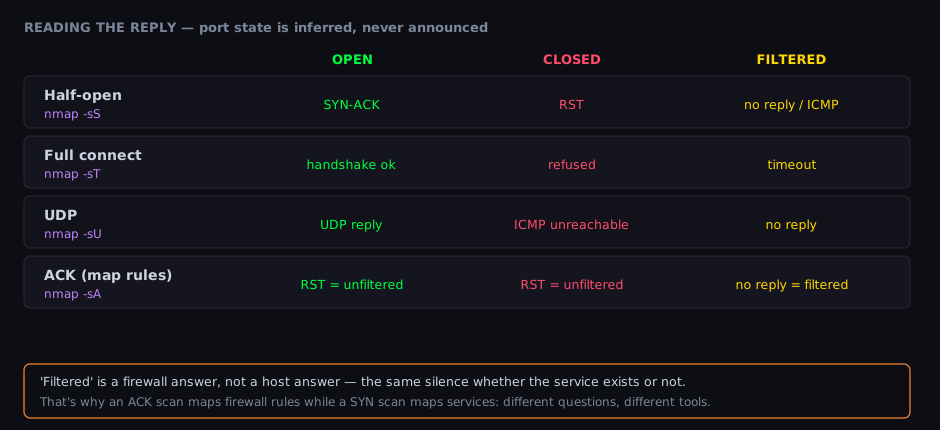
The three states you are trying to tell apart:
- Open — a service is listening and completes (or begins) the handshake.
- Closed — the host is up but nothing is listening; it actively refuses, usually with a
RST. - Filtered — a firewall is swallowing your probe. You get silence, so you cannot tell whether the service even exists.
That last one is the subtle one. "Filtered" is a firewall's answer, not the host's. It is the same silence whether the port is open behind the firewall or not there at all. This is why a half-open (SYN) scan maps services while an ACK scan maps firewall rules — they ask different questions and the replies mean different things.
# Host discovery first: who is even alive in scope?
nmap -sn 10.10.5.0/24

# Then a fast, accurate service + version scan on the live hosts
nmap -sS -sV -T4 -p- 10.10.5.20

# UDP is slow but hides real services (DNS, SNMP, DHCP) — do not skip it
nmap -sU --top-ports 50 10.10.5.20

# Let nmap guess the OS from TCP/IP fingerprint quirks
nmap -O 10.10.5.20#Subnetting and CIDR: the maths that defines your scope
You cannot scan what you cannot address, and you must not scan what you are not scoped for — so subnetting is not optional background, it is the boundary of your entire engagement. CIDR notation (/24, /26) tells you how an IP range is split into network bits (fixed) and host bits (the addresses you can actually reach).
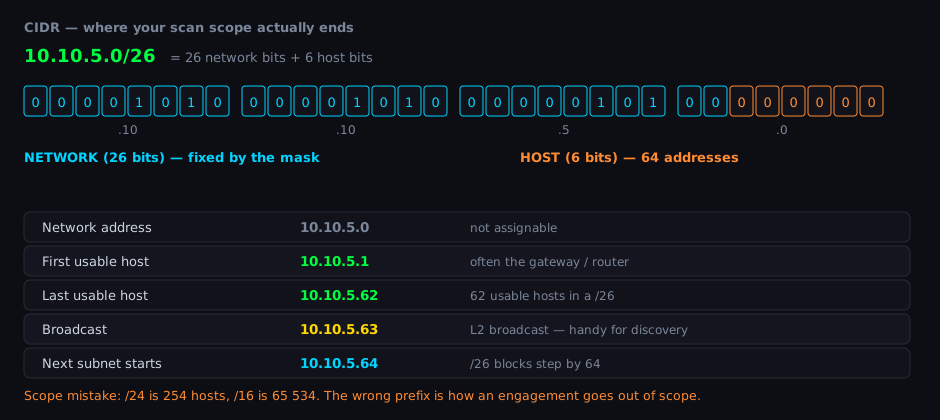
The numbers you should be able to produce without a calculator:
| CIDR | Mask | Usable hosts | Common use |
|---|---|---|---|
/30 | 255.255.255.252 | 2 | point-to-point links |
/29 | 255.255.255.248 | 6 | tiny subnets |
/26 | 255.255.255.192 | 62 | a department |
/24 | 255.255.255.0 | 254 | a classic LAN |
/16 | 255.255.0.0 | 65 534 | a whole campus |
The shortcut: each bit you give to hosts doubles the address count. A /24 has 256 addresses (254 usable after the network and broadcast addresses). Drop to /23 and you have 512. The reason this bites in real life: getting the prefix wrong is how an engagement goes out of scope. Authorised for 10.10.5.0/26 but you type /24? You just aimed at 192 machines you have no permission to touch.
#ARP and the trust problem on the local wire
Here is where "the network assumes everyone is friendly" becomes concrete. On a local network, hosts find each other's MAC addresses using ARP (Address Resolution Protocol): a machine shouts "who has 10.10.5.1?" and whoever owns that IP answers with its MAC.
The catastrophic design detail: ARP has no authentication. Any machine can answer for any IP, and hosts simply believe the most recent reply. That single gap is ARP spoofing.
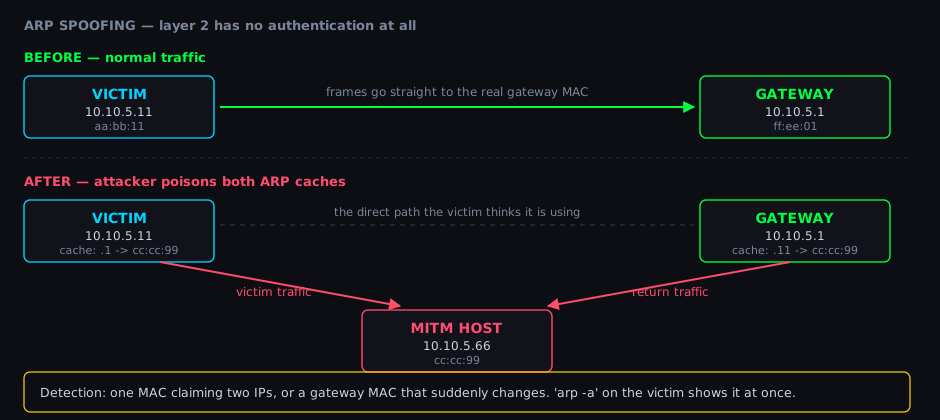
Once a machine has poisoned both the victim's and the gateway's ARP caches, it sits in the middle of their conversation — a classic man-in-the-middle position. It can read, log, or alter traffic that was never meant to pass through it. This is a layer-2 attack, so (as the addressing section warned) it only works from on the same local segment.
#DNS: the internet's address book, and its soft underbelly
DNS turns names into IPs. When you request target.com, your machine does not know its address — it asks a chain of servers until one gives an authoritative answer. Each link in that chain is a place where things can be observed or interfered with.
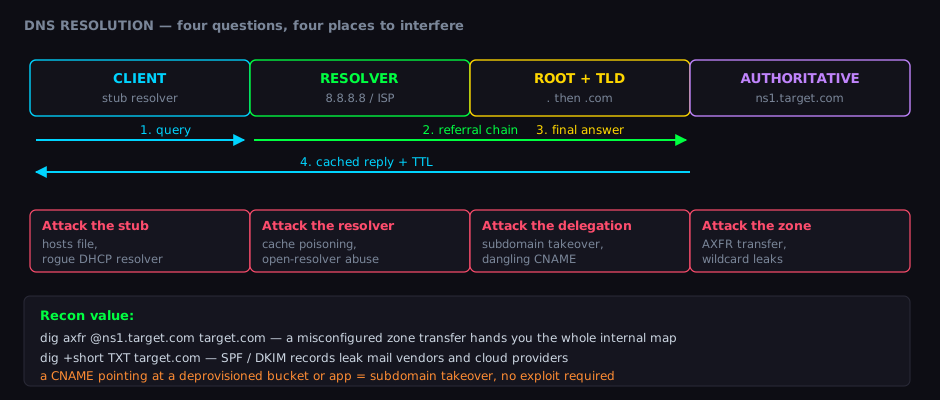
For a tester, DNS is pure gold during reconnaissance — often before you send a single packet to the target itself:
# Every record type: A, MX, NS, TXT — the shape of the target's infrastructure
dig target.com ANY

# Mail and verification records leak which cloud and email vendors they use
dig +short TXT target.com
dig +short MX target.com

# A misconfigured server may hand you its entire zone — every internal name
dig AXFR @ns1.target.com target.com

# Reverse lookups turn an IP range into hostnames
dig +short -x 10.10.5.20
Two findings that need no exploit at all:
- Zone transfer (AXFR) — if a name server is misconfigured to allow transfers to anyone, it hands you a complete list of every host in the domain. An entire internal map, for free.
- Subdomain takeover — if a
CNAMEpoints at a cloud resource that was deleted but never removed from DNS, you may be able to claim that resource and serve content from the target's own subdomain.
#Firewalls, NAT, and why connection direction decides everything
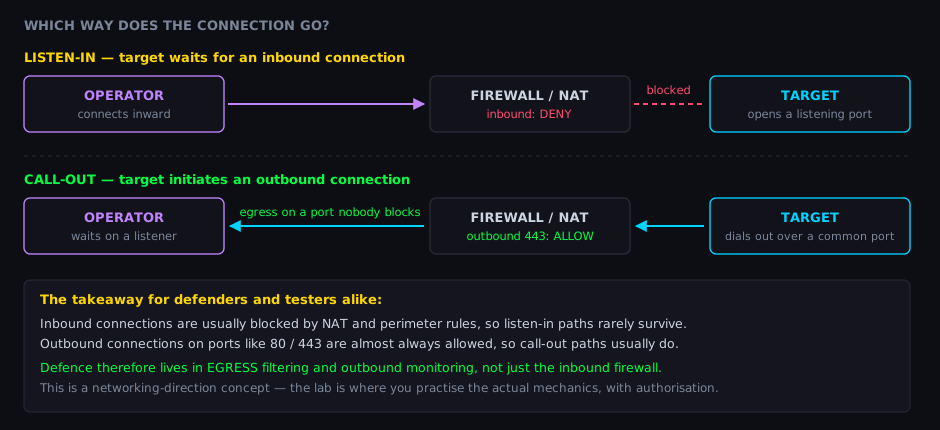
A firewall's core job is simple: decide which packets may pass based mostly on source/destination IP and port. NAT (Network Address Translation) adds a twist — it lets many private hosts share one public IP, and as a side effect it means outside machines usually cannot start a connection to an inside host. There is no public address to aim at.
This asymmetry shapes remote-access techniques more than any other single fact in networking:
The lesson is conceptual and it cuts both ways:
- Inbound connections toward a protected host are usually denied — by NAT, by the firewall, or both. Techniques that rely on an outsider connecting in tend to fail against any realistic network.
- Outbound connections from inside toward the internet are almost always allowed, especially on ports 80 and 443, because blocking them would break normal browsing.
For a defender, the takeaway is sharp: a locked-down inbound firewall is only half the job. Egress filtering — controlling what is allowed to leave — and outbound traffic monitoring are where modern defence actually happens. For a tester, it explains why so much effort goes into understanding a network's outbound rules rather than hammering its front door.
#Pivoting: the first host is a door, not the destination
Real networks are segmented: the web server in the DMZ can be reached from the internet, but the database behind it cannot. So how does anyone reach the database? Through a host that sits on both networks.
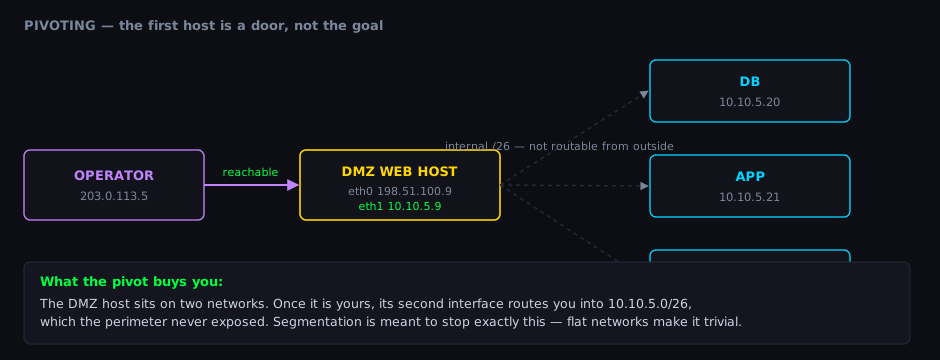
A dual-homed host — one with two network interfaces — is a bridge between segments. Once a tester controls such a host, its internal-facing interface becomes a route into a network the perimeter never exposed. This is pivoting, and it is why segmentation matters: a flat network, where every machine can reach every other, turns one foothold into total reach. A well-segmented network forces the tester to earn each new segment.
#Putting it together: a networking-first methodology
None of these skills live alone. On an engagement they slot into phases, and almost every early phase is pure networking:
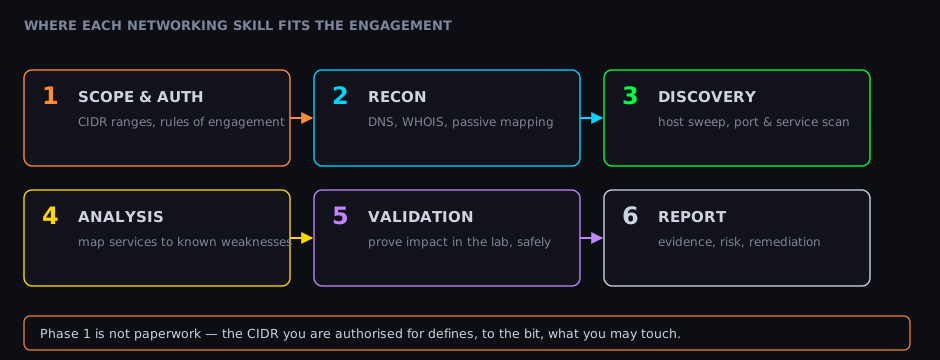
- Scope & authorisation — the CIDR ranges and rules you are permitted to touch. Networking defines the boundary.
- Reconnaissance — DNS, WHOIS, and passive mapping build a picture before you send a probe.
- Discovery — host sweeps and port/service scans turn the picture into a concrete map.
- Analysis — match the services you found to known weaknesses.
- Validation — prove impact, safely, in an environment you are allowed to break.
- Reporting — evidence, risk, and remediation that a defender can act on.
The quality of phases 4–6 is capped by how well you did phases 1–3. You cannot exploit a service you never found, and you cannot find services without understanding how the network answers your probes.
#A practical command toolkit
Keep these in muscle memory. Every one of them is a direct application of a concept above:
# ── Who am I, what network am I on? ──
ip addr                      # my interfaces and IPs (layer 2 + 3)
ip route                     # my routing table — what can I reach, via where?
arp -a                       # local MAC cache — spot a changed gateway MAC

# ── What is out there? ──
nmap -sn 10.10.5.0/24        # host discovery across a subnet
nmap -sS -sV -p- <host>      # full TCP service + version scan
nmap -sU --top-ports 50 <h>  # the UDP services people forget

# ── What is the name/infrastructure picture? ──
dig target.com ANY           # all DNS records at once
dig AXFR @ns1.target.com target.com   # zone transfer (if misconfigured)
whois target.com             # registration + netblock ownership

# ── Watch the wire itself ──
tcpdump -i eth0 -n host 10.10.5.20 # capture traffic to/from one host#Where to go next
Networking is the foundation, not the whole building. With a solid grip on layers, addressing, the handshake, scanning, subnetting, ARP, DNS, firewalls and pivoting, you are ready to specialise — web application testing, Active Directory, wireless, cloud — and you will find that each specialisation is, underneath, the same two questions: what can I reach, and what does it trust that it shouldn't?
The fastest way to make this permanent is to do it, repeatedly, somewhere you are allowed to. Spin up a lab, scan it, capture the traffic, read the headers, break the trust assumptions on purpose, and watch what the defender would see. Each loop turns a paragraph here into an instinct.

